
In 2026, authentication remains the first and most critical line of defense against unauthorized access. With credential-stuffing attacks, phishing kits, and AI-generated deepfake voice/video bypasses becoming more sophisticated every month, relying solely on passwords is no longer viable for most organizations. Modern authentication methods combine something you know, something you have, something you are, and increasingly something you do or where you are.
This article explains the top authentication methods used today, their strengths and weaknesses, real-world adoption rates (based on 2025–2026 industry reports), and when each type makes the most sense for personal, enterprise, or high-security environments.
1. Knowledge-Based Authentication (Passwords & PINs)
The oldest and still the most widespread method.
- Users provide a secret string (password) or numeric code (PIN).
- Variants include security questions, pattern locks on mobile devices.
- 2026 reality: Over 70% of consumer logins still start with a password (per Verizon DBIR 2025), but 81% of breaches involve stolen or weak credentials.
Pros
- Zero hardware cost
- Familiar to every user
- Easy to implement and reset
Cons
- Reused across sites → credential stuffing
- Weak passwords cracked in seconds by modern GPU clusters
- Phishing remains extremely effective
Best for Low-risk consumer apps, legacy systems, emergency fallback when other factors fail.
2. Something You Have – One-Time Passcodes (OTP / TOTP)
The classic second factor that dramatically reduces account takeover risk.
- Time-based (TOTP): Google Authenticator, Authy, Microsoft Authenticator generate 30-second codes.
- SMS / email OTP: Still used but increasingly deprecated.
- Hardware tokens (YubiKey OTP mode, RSA SecurID).
Pros
- Blocks 99%+ of automated credential-stuffing attacks
- TOTP is free and works offline
- Hardware tokens are phishing-resistant when used correctly
Cons
- SMS vulnerable to SIM-swapping
- Email OTP intercepted via compromised inboxes
- User fatigue when codes are requested frequently
Best for Consumer banking, email, social media, small-to-medium businesses adding 2FA without hardware rollout.
3. Biometric Authentication (Fingerprint, Face, Iris, Voice)
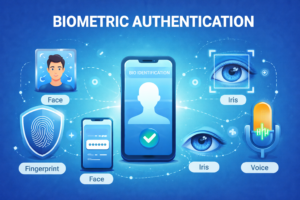
The fastest-growing category thanks to smartphone ubiquity.
- Fingerprint (capacitive, ultrasonic) → Apple Touch ID, Android in-display sensors
- Facial recognition → Face ID, Windows Hello, Android Face Unlock
- Iris scanning → Still niche but used in high-security government systems
- Voice biometrics → Call-center authentication, some banking apps
Pros
- Extremely convenient (no typing or remembering)
- Very hard to forget or lose
- High accuracy in good conditions (99.9%+ for modern facial systems)
Cons
- Spoofing possible (photos, masks, 3D-printed fingers, deepfake audio/video)
- Privacy concerns (biometric data breach is permanent)
- Environmental factors (wet fingers, bad lighting, glasses/masks) reduce reliability
Best for Mobile devices, laptop login, physical access control in offices.
4. Possession-Based Hardware Tokens (FIDO2 / WebAuthn / Passkeys)
The gold standard for phishing-resistant authentication in 2026.
- FIDO2 security keys (YubiKey, Google Titan, Feitian ePass)
- Passkeys (synced across Apple, Google, Microsoft ecosystems)
- Platform authenticators (built-in phone TPM or laptop Secure Enclave)
Pros
- Cryptographically bound to domain → immune to phishing
- No shared secret to steal
- Passkeys eliminate password entirely for supported sites
- Adoption exploding: 1.5 billion passkeys created by end of 2025 (FIDO Alliance)
Cons
- Upfront cost for physical keys
- Loss of device/key requires recovery flow
- Legacy sites/apps still don’t support FIDO2
Best for Enterprise SSO, high-value accounts (crypto wallets, banking, government), any organization serious about stopping phishing.
5. Behavioral & Contextual Authentication (Zero-Trust Style)
Invisible, continuous authentication that runs in the background.
- Keystroke dynamics, mouse movements, gait analysis via smartphone sensors
- Device fingerprinting (browser, OS, screen resolution, fonts)
- Geolocation + IP velocity checks
- Login time-of-day patterns
Pros
- No user friction
- Detects anomalies even after initial login
- Very effective against account takeover post-credential theft
Cons
- Privacy-invasive (tracks behavior continuously)
- False positives frustrate legitimate users
- Requires mature machine-learning backend
Best for Enterprise identity platforms (Okta, Microsoft Entra ID, Ping Identity), fraud detection in banking/e-commerce.
6. Multi-Factor & Adaptive Authentication (The Modern Standard)
Not a single method, but the intelligent combination of the above.
- Step-up authentication: password + TOTP for normal login, then biometric or FIDO key for sensitive actions
- Risk-based / adaptive: low-risk login = password only; high-risk (new device, unusual location) = push notification + biometric
- Passwordless flows: passkey + device-bound biometrics
Pros
- Balances security and usability
- Drastically reduces breach impact
- Meets NIST 800-63-3 AAL2/AAL3 requirements
Cons
- Complex to implement correctly
- Vendor lock-in if using proprietary adaptive engines
Best for Every organization moving beyond basic MFA in 2026.
Final Thoughts
In 2026 the real hierarchy of authentication strength looks like this:
- Phishing-resistant FIDO2 / passkeys (strongest)
- Biometrics + hardware token
- TOTP authenticator app
- SMS OTP (still better than password alone)
- Password + security questions (weakest acceptable option)
The most secure organizations are rapidly moving toward passwordless + adaptive MFA using passkeys wherever possible, with biometrics or FIDO hardware as fallback. For individuals, enabling passkeys on major services (Google, Apple, Microsoft) and adding a security key for critical accounts is the single highest-impact step you can take right now.
Authentication is no longer about “good enough”—it’s about staying ahead of AI-powered attackers. Choose methods that match your risk profile and never stop reevaluating as threats evolve.